


- Key Takeaways
- GDPR Requirements for Websites: What They Are and Who They Apply To
- ADA Website Compliance: What It Is and Why WCAG Matters
- GDPR vs. ADA: How These Two Compliance Laws Actually Differ
- GDPR Requirements for Cookie Consent on Your Website
- GDPR Data Subject Rights Every Website Must Support
- GDPR Requirements Beyond Cookies: Privacy Policies, DPAs, and Breach Response
- Common Mistakes That Put Websites Out of ADA and GDPR Compliance
- How to Audit Your Website Against ADA and GDPR Requirements
- Frequently Asked Questions About GDPR Requirements
- Do GDPR requirements apply to a US business with no EU office?
- Is there a single combined ADA and GDPR compliance checklist?
- What happens if a website ignores GDPR requirements entirely?
- Does a small business really need to worry about ADA lawsuits?
- How often should a website be checked against ADA and GDPR requirements?
- Stay Compliant and Protect Your Business with Ankord Media
A single cookie banner that fires before anyone clicks “accept” can turn a perfectly good website into a liability. So can a contact form a screen reader cannot navigate. Most business owners find out about problems like these only after a demand letter shows up, not before.
Here is the confusion that costs people the most time. ADA accessibility rules and GDPR requirements get treated as one combined checklist constantly, and they are not one checklist. They come from two different legal systems, they carry two different kinds of penalties, and fixing one does nothing to fix the other.
A site can pass every accessibility test and still violate GDPR the moment an analytics script fires before a visitor clicks anything. The reverse is just as true, which is exactly why this guide treats them as two separate problems with two separate fixes.
We are Ankord Media, a technology and content management agency built for founders, doctors and small business owners in Los Angeles and across Silicon Valley. We build brand identity and websites with compliance treated as a standard part of the build, not an afterthought bolted on after launch.
This guide walks through what ADA accessibility and GDPR requirements actually demand from a website, where the real risk sits, and what to check first. If you want your current site reviewed directly, book a call and we will walk through it with you.
Key Takeaways
- ADA and GDPR are separate laws with separate obligations, separate enforcement bodies, and separate penalties. Passing one tells you nothing about whether you pass the other.
- WCAG 2.1 AA is the accessibility standard courts and settlements actually use in practice, even though the text of the ADA itself never mentions websites at all.
- Private businesses face no codified ADA compliance deadline the way government entities do, but lawsuit volume against private businesses is already high and has continued climbing year over year.
- GDPR applies to US businesses with EU visitors, EU customers, or any tracking technology that touches EU traffic, regardless of whether the business has a single employee or office in Europe.
- A cookie banner by itself is not valid GDPR cookie consent. Non-essential cookies have to stay blocked until a visitor actively opts in, not just until a banner appears on screen.
- GDPR data subject rights need a working process behind them, with a real person or workflow able to respond, not just a sentence in a privacy policy claiming the rights exist.
- Data processing agreements with third party tools, breach notification procedures, and accurate privacy policies are just as much a part of GDPR as the cookie banner everyone focuses on.
- Compliance is ongoing, not a one time task. Most violations trace back to a site that changed after launch, through a new form, a new tracking pixel, or a new page, without anyone revisiting the original audit.
- Startups, medical practices, and small businesses each carry distinct versions of this risk, and the right starting point looks different depending on which category a business falls into.

GDPR Requirements for Websites: What They Are and Who They Apply To
Here is the part most American business owners get wrong immediately. GDPR requirements are not a European problem that stops at the border.
GDPR reaches any business, anywhere, that processes personal data belonging to people in the EU or EEA. A US based service business with a newsletter signup that collects emails from EU visitors is in scope. So is a company running retargeting ads that track EU traffic, even without a single EU employee or office anywhere in the organization.
Picture a small consulting firm based in California. If a handful of visitors from Germany sign up for a mailing list, that firm now has obligations under GDPR, whether anyone on the team realized it or not.
That is the extraterritorial reach of the law, and it catches more small businesses off guard than almost any other aspect of GDPR requirements. The trigger is whose data gets touched, not where the business itself is headquartered.
Two roles matter here, and they determine who is actually on the hook for what. A data controller decides why and how personal data gets collected and used. A data processor acts on the controller’s behalf, usually a third party tool like an email platform or a CRM.
Almost every small business website is a controller. That distinction determines which specific obligations apply directly to the site owner rather than to a vendor downstream, so it is worth knowing which role applies before assuming a tool handles everything automatically.
One flexibility worth knowing about. Businesses with fewer than 250 employees get somewhat lighter documentation requirements under GDPR. That is not an exemption from the law itself. The core principles, including lawful basis, data minimization, and consent, still apply in full regardless of company size.

ADA Website Compliance: What It Is and Why WCAG Matters
ADA website compliance starts with a detail that trips up almost everyone searching for a straight answer. The Americans with Disabilities Act never mentions websites anywhere in its text, because the law was written in 1990, well before the commercial internet existed in any meaningful form.
That silence is exactly why this topic gets confusing fast. Business owners expect a law to spell out website requirements directly, and when it does not, the natural assumption is that no real requirement exists. That assumption is wrong.
Courts filled that gap themselves over the past two decades. The Web Content Accessibility Guidelines, known as WCAG, are not a law on their own.
But they function as the practical legal standard, since courts and settlements consistently point to WCAG when deciding whether a website meets the ADA’s accessibility requirement. Courts have repeatedly ruled that websites of public accommodations fall under Title III of the ADA, and nearly every private settlement in this space requires WCAG 2.1 AA conformance as the resolution.
Why WCAG 2.1 AA Is the Standard Courts Actually Use
WCAG organizes everything around four principles, and understanding them makes the rest of this section click into place quickly. Content has to be perceivable, meaning something like alt text on images so a screen reader can describe what a sighted visitor sees without needing to look at the screen.
It has to be operable, meaning full keyboard navigation for anyone who cannot use a mouse due to a motor impairment. It has to be understandable, meaning consistent navigation and clear form labels rather than a different layout on every page that forces a visitor to relearn the site repeatedly.
And it has to be robust, meaning the underlying code is clean enough for assistive technology to actually read it correctly, rather than breaking down the moment a screen reader tries to parse it. WCAG 2.2 is technically the newest version available as of this writing.
But businesses are still being held to WCAG 2.1 AA for the time being, so that is the version worth building toward rather than chasing the newer release before it becomes the enforced standard in practice.
ADA Compliance Deadlines for Government vs. Private Business Websites
This is where a lot of competing content gets genuinely sloppy, so it is worth being precise. The Department of Justice issued a final rule in 2024 setting WCAG 2.1 AA as the technical standard for certain entities, and an interim rule in April 2026 extended the compliance deadlines further into 2026 and 2027.
That rule applies specifically to Title II entities, meaning state and local government websites. It does not apply to private businesses in the same way, and conflating the two is one of the most common factual errors floating around online right now.
Private businesses have no codified deadline tied to any government rule at all. That does not mean no exposure exists.
Thousands of ADA lawsuits get filed against private businesses every single year regardless of any government timeline, and that volume has been climbing, not shrinking, over the past several years. The absence of a formal deadline is not the same thing as the absence of risk.
What WCAG 2.1 AA Actually Checks on Your Site
Here is a list worth checking today, not next quarter. Does every meaningful image have alt text that actually describes what it shows. Can the entire site be navigated using only a keyboard, with no dead ends that trap a visitor on one page.
Does text have enough color contrast against its background to actually read clearly for someone with low vision. Does video content include captions for anyone who is deaf or hard of hearing. Is the heading structure logical and consistent from page to page, rather than skipping levels or repeating the same heading style for unrelated content.
Do forms have clear labels and error messages that explain exactly what needs fixing rather than a generic “error” with no context. Every one of these is something that can be checked on a live site right now, without any special tool or technical background required.
GDPR vs. ADA: How These Two Compliance Laws Actually Differ
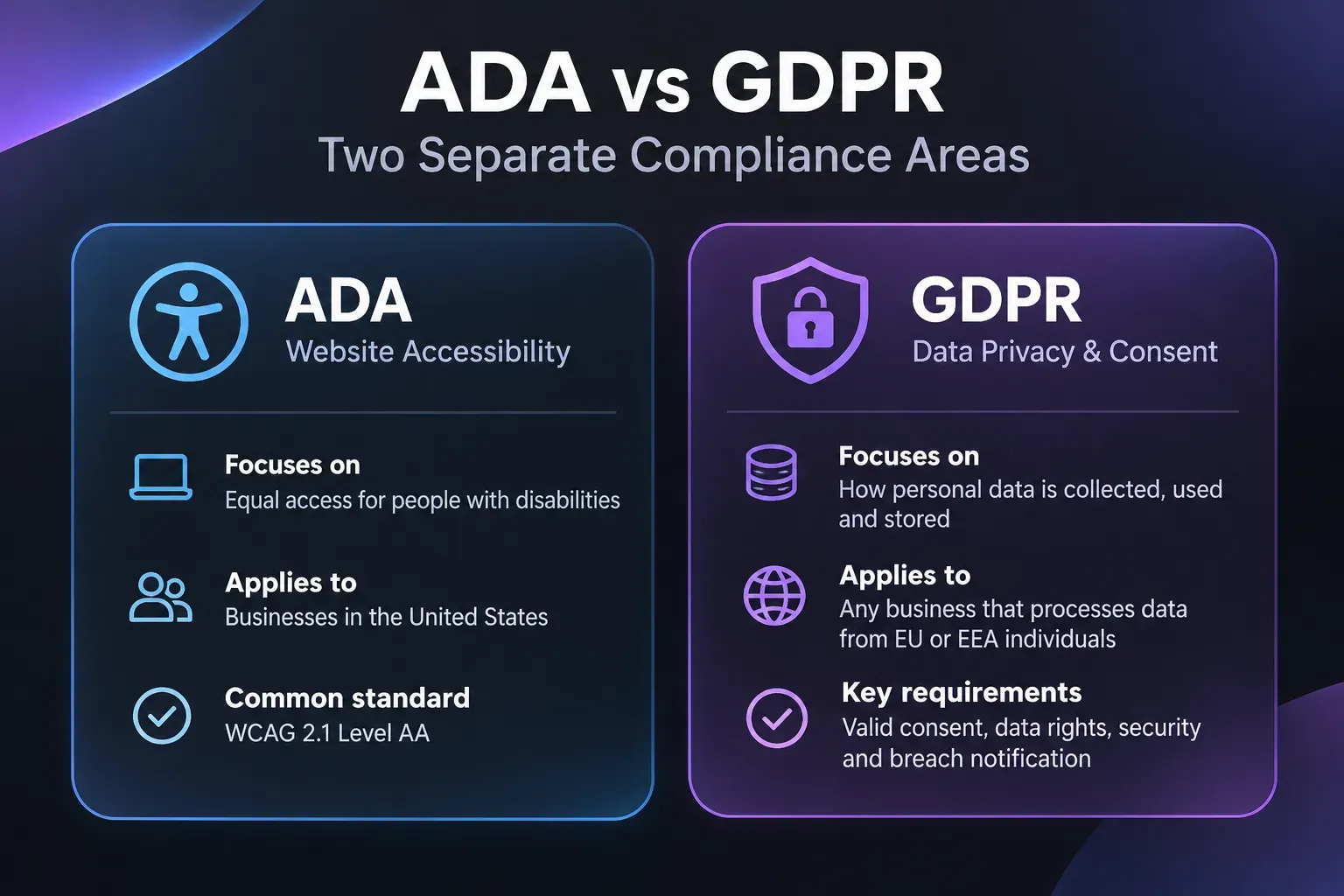
Keep this distinction simple and permanent, because it resolves most of the confusion that sends people looking for a combined checklist in the first place. ADA accessibility governs who can access and use a website. GDPR governs what a website does with a visitor’s data once they are already on it.
One is about the door. The other is about what happens after someone walks through it. They answer completely different questions, and a business can score well on one while failing the other entirely.
The practical consequence matters more than the legal theory behind it. A website can be fully accessible under WCAG and still violate GDPR the moment it fires a tracking script before consent is given.
The reverse is just as true. A site can have a textbook perfect cookie banner and still fail an accessibility audit because of missing alt text and broken keyboard navigation somewhere else on the same page.
These are two genuinely independent risks. Fixing one does not touch the other, and treating them as a single combined checklist is exactly how gaps slip through unnoticed until someone else finds them first.
GDPR Requirements for Cookie Consent on Your Website
Cookie banners are the one piece of GDPR almost every internet user has actually seen, so this is the part people assume they already understand. Most of them do not, because a banner alone is not GDPR cookie consent. The requirement sits in what happens behind that banner, not the banner itself.
Non-essential cookies, meaning anything beyond what is strictly necessary for the site to function, have to stay blocked until a visitor actively consents. If analytics or marketing scripts fire the moment the page loads, before anyone clicks anything at all, that already breaks the requirement regardless of how good the banner looks on screen.
A handful of specific rules make a banner actually valid under the law. There can be no cookie walls that block access to the site unless the visitor accepts cookies first. Accept and reject options need equal visual weight, not a prominent accept button next to a buried or hard to find reject link tucked into fine print.
Boxes cannot come pre-checked by default. And withdrawing consent later has to be just as easy as giving it was in the first place, not hidden three menus deep where almost nobody will ever find it.
One current wrinkle worth knowing about. A 2026 update in the UK created a narrow exemption for certain low risk first party analytics cookies used only to measure aggregate site performance.
That exemption is UK specific and does not extend across the Channel. Any US business with EU visitors still needs to meet the stricter EU standard, since the UK carve out has no bearing on how EU regulators enforce the rule.
GDPR Data Subject Rights Every Website Must Support
Strip the legal language away and this section is really about what a website visitor can demand from a business, directly and on request. GDPR data subject rights give individuals the right to know what data is being collected about them in the first place, and the right to access a copy of it on demand.
They also include the right to have inaccurate data corrected, the right to have it deleted entirely, and the right to receive it in a portable, usable format if they want to take it elsewhere. Each of these is a real, enforceable right, not a courtesy a business can choose to honor selectively.
The part that actually matters in practice is this. These rights need a working process behind them, not a sentence buried in a privacy policy that simply claims they exist.
If a visitor emails asking what data has been collected about them, is there an actual person or workflow ready to respond, within a reasonable timeframe, with real and specific information. If the answer is no, the rights on paper are not the rights in practice, and that gap is exactly what regulators look for.
GDPR Requirements Beyond Cookies: Privacy Policies, DPAs, and Breach Response
Cookies get the attention, but GDPR covers a lot more ground than consent banners alone. A compliant privacy policy has to clearly disclose what data gets collected, why it is collected, how long it gets kept, and whether it gets shared with any third parties.
That disclosure needs to be written in language a regular visitor can actually understand, rather than dense legal text copied wholesale from a template built for a different kind of business entirely.
Data processing agreements matter more than most site owners realize. Any third party tool touching visitor data on a business’s behalf, whether that is an email platform, a CRM, or an analytics provider, needs a documented agreement governing exactly how that data gets handled on the business’s behalf.
Skipping this step is one of the most common gaps in an otherwise reasonable compliance setup, largely because it happens behind the scenes where nobody thinks to check.
Breach response has a hard deadline attached to it. Organizations generally have 72 hours from discovering a breach to notify the relevant authority, and that notification has to describe what happened, who was affected, and what steps are being taken to fix it.
Waiting to figure out this process after a breach has already happened is the worst possible time to build it from scratch, under pressure, with a clock already running.
Common Mistakes That Put Websites Out of ADA and GDPR Compliance
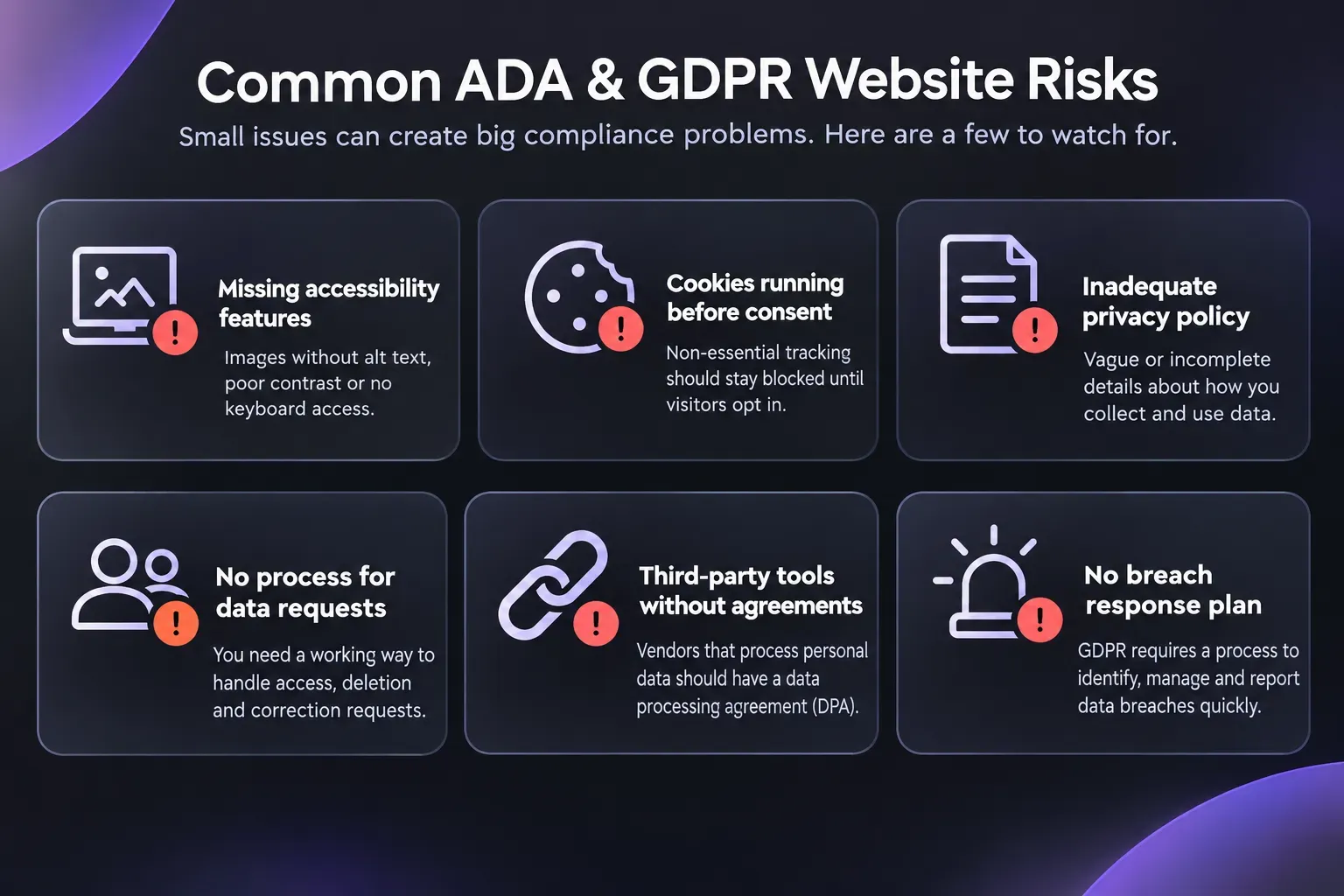
This list is meant to be specific enough to actually check against a live site today, rather than a vague reminder to “be careful.” Missing alt text on product or blog images is one of the most common and easiest to fix. Color contrast that looks fine to a designer’s eye but fails WCAG’s actual measured ratio is another.
Analytics or ad pixels firing before any consent click happens is a frequent and often invisible mistake, since it happens in the background where nobody notices unless they check the network activity directly. Cookie banners with a prominent accept button and a reject option that is harder to find or buried in a settings menu fall into the same category.
Privacy policies that were copied from another company’s site and describe data practices that do not match what the business actually does are surprisingly common, and they create real legal exposure the moment anyone compares the policy to actual practice.
Nearly every one of these mistakes traces back to the same root cause. Compliance got treated as a one time task finished at launch, rather than something revisited every time the site changes in any meaningful way.
A new form, a new tracking pixel, or a new page added six months after launch can quietly reopen a gap that was closed the first time around, and nobody notices until it has been open for months.
How to Audit Your Website Against ADA and GDPR Requirements
Here is a starting point worth doing this week, not a replacement for a full professional audit. Try navigating the entire site using only a keyboard, no mouse at all, and note anywhere you get stuck or lose track of where you are on the page.
Run the site through a free automated accessibility scanner to catch the most obvious issues quickly. Open the site in an incognito window and watch the network activity to see whether any tracking scripts fire before a cookie banner gets a response from the visitor.
Automated tools catch a real share of issues, but not all of them by any means. Plenty of accessibility and privacy gaps only show up under manual review, which is exactly where a partner who treats ADA website compliance and GDPR requirements as a standard build practice, rather than a one off fix, earns its keep over time.
Examples of how this gets built into real client work live in the portfolio.
Startups and Early-Stage Founders
Investors and enterprise customers increasingly expect compliance basics to already be handled before a term sheet or a vendor contract gets signed. Discovering an accessibility or privacy gap during due diligence ahead of a raise is a far worse moment to find out than catching it now, while there is still time to fix it quietly and move forward without friction.
Doctors and Medical Practices
The stakes compound for this segment specifically, in a way that makes the audit step genuinely urgent rather than optional. Patients are disproportionately likely to rely on assistive technology, which puts accessibility directly in the spotlight for this audience more than almost any other.
Add in scheduling forms and patient intake tools collecting personal information, and a medical practice is carrying real exposure on both the ADA and the privacy side at the same time, not just one or the other in isolation.
Small Business Owners
Most small business owners do not have in house legal or technical staff watching this on an ongoing basis, and that reality is exactly the argument for building compliance into the site from day one rather than circling back to it only after a complaint arrives.
What that looks like, cost wise, is outlined on the pricing page, where accessibility and privacy fundamentals are part of the build itself rather than a line item added later as an upsell.
Frequently Asked Questions About GDPR Requirements
Do GDPR requirements apply to a US business with no EU office?
Yes. GDPR applies based on whose data gets processed, not where the business is physically located. EU visitors, EU customers, or tracking that touches EU traffic all trigger GDPR obligations regardless of where the company itself is based or headquartered.
Is there a single combined ADA and GDPR compliance checklist?
No, and treating them as one checklist is a common and costly mistake. They are separate laws covering separate things, access on one side and data handling on the other, and each genuinely needs its own review process.
What happens if a website ignores GDPR requirements entirely?
Penalties scale with severity and can reach into the millions of euros or a percentage of global revenue for serious violations. Even smaller violations carry real financial and reputational risk, and enforcement activity has only increased in recent years rather than slowing down.
Does a small business really need to worry about ADA lawsuits?
Yes. Lawsuit volume against private businesses, including small ones, has stayed high for years and shows no meaningful sign of slowing down. Business size does not provide the kind of protection from legal exposure that many owners assume it does.
How often should a website be checked against ADA and GDPR requirements?
At minimum, any time the site adds a new form, a new tracking tool, or a significant new page. Compliance drifts quietly as a site evolves, so a periodic review catches what a one time launch audit cannot.

Stay Compliant and Protect Your Business with Ankord Media
Compliance is not a box checked once at launch. It shifts as laws change, as a site changes, and as the tools added to it change what data gets collected along the way.
We build ADA and GDPR requirements into every project as a standard, not a bolt on sold after the fact. If you want your current site checked, book a call and we will walk through exactly where you stand.
More guides like this one are available on the blog while you decide what is right for your business.